

Don’t Have a 2 Ton Brick Sticking Out The Side Of Your Computer
Today we’ll cover the kind of broadband card will accentuate your inner-cool. As a side benefit, it’ll actually work with your computer.
Since you probably know what mobile broadband is & why you should get it, we’ll skip past that and cover:
- What are the 4 types of broadband cards?
- How each connects to your laptop or PC.
- Narrowing it down to just one after checking the pros & cons.
So Where Do You Plug It In?
Depending on the card, it can fit into either a USB, PC Card, ExpressCard slot or connect wirelessly. Naturally, each has its ups and downs:
USB Broadband Cards
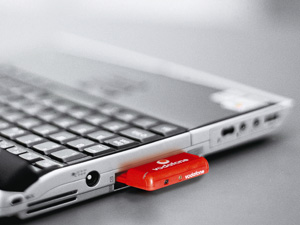
USB cards are the most compatible across the board if you need to plug it in. Whether you’ve got a Macintosh or a PC, it’ll most likely work with this universal standard. A couple USB cards look like this: 


And plug into your laptop like this: 
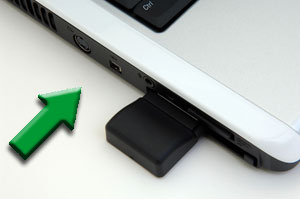
Now, there are exceptions to this rule. Not all USB broadband cards will point up. Some point to the side and look like our affectionate brick above.
Avoid that at all costs. It’s a recipe for disaster.
It might not be too much of a problem if you’re sitting in one place all the time. However, if you’re in confined spaces (think airplanes, cars, subways), you’re asking for your card to bump into something, twist the USB drive and damage itself and your laptop.
That’s no good. I’m dealing with that right now. If you go with USB, get one that points up and is not so intrusive.
Bottom-Line?
- Familiar USB interface for high compatibility
- Can be plugged into USB cradles or docking stations easily
- Compatible with certain wireless routers
- Depending on the model, they don’t stick out too much.
PC Cards
These are also known as PCMCIA (Personal Computer Memory Card International Association) Cards. Originally designed for computer memory expansion, manufactures soon found it could be used for a variety of things like mobile broadband and WiFi.
While most PC’s come with PC Card slots, many laptops manufacturers are excluding them in favor of ExpressCard slots since 2007. Furthering the image as a dying breed, all mobile broadband providers except T-Mobile (who carries one card) no longer sell PC Cards.
Here’s what the lone card standing looks like: 
When fully inserted, it fits snug like the ExpressCard: 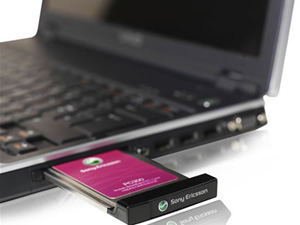
Bottom-Line: It fits snug and works great, but unfortunately, they are on their way out.
ExpressCards
ExpressCards do the same thing. They just look and fit differently. While USB fits into the oh-so-familiar spots, ExpressCards are the upgrade from PC Cards. You’ll be able to identify them by how slender they are: 


Like PC Cards, they also fit pretty snug in laptops: 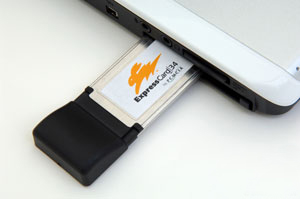
While ExpressCards can be 34mm or 54mm wide. Mobile broadband cards are exclusive to the 34mm size to conserve on space.
Here’s why that’s important. If you go with an ExpressCard, be sure that your computer supports the 34mm size. That way, you’re not stuck with a card that can’t fit your laptop.
With everything taken in perspective, ExpressCards come off as the best of both worlds:
1. There’s a high range of compatibility for both PC’s and Mac’s.
2. They don’t stick out too much.
3. Less likely get damaged.
4. Certain models come with retractable antennas for better reception.
5. Compatible with certain wireless routers for sharing your mobile broadband connection.
Checking Technical Specs
The last thing anyone needs is to end up with a broadband card that doesn’t work. That’s why it’s absolutely crucial to make sure your laptop’s operating system is supported. When looking at a particular card, be sure to check the specifications to see that it runs on Windows XP, Vista or Mac OS X.
Side By Side Comparison 

*Could’ve made an original video but why invent the wheel eh? Enjoy!
There’s a 4th kind of ‘card’ that’s not quite a card. Enter the mobile hotspots.
Mobile Hotspots (MiFi)

Personal Hotspots are the Lamborghinis, Ferraris and Porsches of broadband devices. They’re new, they’re hot, they’re slick and do a bunch of things you Honda Accord won’t do.
First up is the form factor.
At literally the size of a credit card (and not much thicker), it fits in your top pocket. Somehow they found a way to make something slicker than the iPhone. To cut a long story short, the Novatel MiFi (sold by Sprint & Verizon) brought sexy back to mobile broadband.
With features that Q provides James Bond with, the MiFi allows for a number of cool things. The biggest aha moment comes courtesy of the fact that its completely wireless.
It receives the mobile broadband connection from the towers like a cell phone but then broadcasts it via WiFi like a wireless router.

In doing so, it expands the possibilities of mobile broadband.
Suddenly you no longer worry about compatibility and support for netbooks, laptops, Linux, windows or Mac. Instead, you’re figuring out how you can connect your WiFi enabled phone, printer, iTouch, camera and even digital photo frames.
To stack the cool even more, you might just have GPS thrown in for good measure.
The only major downside to the MiFi is a 5 GB restriction imposed by carriers.
Expect this to change. It’s unreasonable to offer 5GB for one device (netbooks) and then provide a device that lets you share it with up to 5 devices. Shame on you carriers.
What It Comes Down To
Here’s the deal. Your choice is between USB broadband cards and the MiFis. If you’d like a little extra functionality and your laptop supports it, then go for broadband card. If you don’t care too much for bells and whistles, the MiFi will pretty much work with anything.
One other technical aspect to the cards is this:
PCMCIA Cards (PC Cards) are ‘slower’ than USB and ExpressCards. PCMCIA has a max transfer rate of 12 Mb/s while USB has a max transfer rate of 400 Mb/s. Now, this would actually matter if the speeds mobile broadband companies could utilize that potential.
The max speed you can get from Verizon, or Sprint is 3.1 Mb/s…much less than the 12 Mb/s a PCMCIA card can handle (AT&T is less but working on upgrading to 7.2 Mb/s). Will Sprint, Verizon or AT&T be upgrading their network to max that out before you can upgrade again? Probably not.
N.B. If it works on Windows Vista, then it’ll work on Microsoft’s latest operating system Windows 7. I’ve been testing it myself and its very smooth.
Get a Free Broadband Card or MiFi
The beauty of it is that you can cancel and get a full refund (if you even paid anything) within the first week of testing it out in the event you feel it’s not working out for you.
Cheers to the internet without wires:


If you decide to get mobile broadband through one of the links below, I do make some money. Just some full disclosure. Besides, every broadband card is free or puts money in your pocket. Talk about win-win.
William E Tiller Jr says:
Thank You,
I am in the process of deciding whether to
use Mobile Broadband. This saves me a lot of time. I love the comparisons
Marc says:
No problem William. I’m glad it could help. Drop me a line if you’d like any more help deciding
Walter Mousseau says:
I am in the process of changing my Broadband plan(S). I travel between Montreal Canada and New York State daily and currently use two different USB devices and although I usually switch when I get near the border I oftentimes get exorbitant roaming charges. I am looking for one company that will provide the best and least expensive coverage for both countries. I also would like to use a card instead of USB and I want a Hotspot for my wife to also use while I am in the States. Am I asking too much?
Marc says:
Hey Walter,
You just might be. Once you get into the territory of international mobile broadband (even if over such a short geographical space) things get really messy thanks to this ‘border’ thing.
For example, AT&T one of the more reputable companies for international mobile broadband (and not domestic funny enough) has their regular plans for the U.S. that include Canadian data at $0.015/KB. After running the conversion, that’s $15.36/MB or (brace yourself) $15,728.64 for 1 GB.
It frustrates me so much I don’t write about it often. Though with your comment I’m considering taking another swing at it.
I know of a site that does tackle International Wireless/Mobile Broadband that might be able to help you though:
http://www.prepaid-wireless-guide.com/international-wireless-broadband.html
They list prepaid Canadian mobile broadband. Also, you could pair that with the prepaid mobile broadband options I’ve listed here:
http://www.mobile-broadband-reviews.com/prepaid-mobile-broadband.html
Besides that, the only other things I could think of is getting postpaid contracts in both countries.
Hope this helps.
Zach says:
Hi i’m thinking of going with a verizon mobile broadband card since they offer you a different plan that gives more then 5gb a month and instead will give me 10gb a month i’m only 17 and where i live i can only get hughesnet which is so so slow i watch videos often sometimes maybe 3-4 hours a day total and i do light online gaming so my main question is will a verizon mobile broadband card or mifi be ok for that? i have tried googling my q
Zach says:
sorry clicked enter by mistake. i have tried googling my question but i never really get anything and i know that the store/website is just gonna tell me it will to get me to buy it i have looked at the data calculator on verizons website but i dont really kno if its right or not lol.
Marc says:
Hey Zach,
Thanks for stopping by. I do believe the 10 GB per month will be more than enough for light gaming and your other internet activities. Hope this helps! I recommend going for the UML290 since it’s 3G/4G compatible. While you don’t have 4G in your area yet, Verizon plans to expand coverage to 98% of the country. This way, you wouldn’t need to buy a new device when they do:
It’s free on the spot here.
linda says:
We are in the midst of an ISP change from satellite and your site and e lessons are quite helpful. I wish in this lesson that you touched on/forewarned us about “qualified data plans” one needs when working with a USB/mifi/hotspot. It great to get a card free to test, but other costs do apply… must be a different lesson…
and while I have your attention, a personal beef I have is that the links scattered thru an article often have NOthing to do with the article content– just a trigger for advertizing (tho I understand that you are making $ from this site yourself). but that personally bugs me and hubbie.